
The accounting software still is working. The customers are known by the team. Orders are, as a matter of fact, getting handled, but the spreadsheet that once tracked stock now has twelve tabs, customer prices live in several places, to a significant degree. As, well, nobody is completely sure whether yesterday’s emailed order was entered twice.
This is often sketched as the moment a business “needs an ERP”. In fact, there’s typically a advantageous middle stage between spreadsheets and a full enterprise system, when you try it, in many respects.
The right wholesale software for small business is often a compact, connected stack, such as accounting for finance, a wholesale operations layer for customers/orders/stock, and only the specialist tools that are tackling a real restriction, at least in principle.
You do not need an ERP just because spreadsheets are failing
ERP systems are designed to bring many business functions into a widespread data model. That can (in practice) be helpful, but setup also introduces process design, migration, permissions, training and ongoing administration, at least in practice.
The immediate issue is ordinarily narrower for a small distributor. Indeed, they need to stop retyping orders, know what stock is available, keep customer prices uniform and control buying without creating another spreadsheet, in real-world scenarios.
The better question is therefore not “Are we big enough for ERP?” but “Which processes now need one shared operational record?”
| Capability | Spreadsheets + accounting only | Connected small-business stack | Full ERP |
| Financial accounting | Strong if accounting package is maintained | Strong | Strong |
| B2B customer ordering | Manual / external | Integrated portal/app possible | Usually module or integration |
| Customer-specific pricing | Often manual | Purpose-built | Usually configurable |
| Live stock visibility | Fragile as volume grows | Good if one operational master | Strong |
| Purchasing | Email/spreadsheet heavy | PO workflow possible | Deep controls |
| Warehouse complexity | Limited | Good for light to mid complexity | Best for multi-process environments |
| Implementation burden | Low initially | Moderate | High |
| Best fit | Very early stage | Growing wholesaler | Complex, multi-function operation |
The minimum wholesale software stack
Most small wholesalers are needing three connected layers rather than ten separate apps, before ERP, in the main.
- Accounting: invoicing, VAT, bank reconciliation, payments and statutory financial entries.
- Wholesale operations: customers, price lists, sales orders, stock, buying and fulfilment visibility.
- Customer ordering: B2B website/app and, where applicable, sales-rep ordering connected to the same operational data.
The principle is to keep the number of systems low enough that each one clearly owns and data doesn’t need manual reconciliation every day, in actual application. You can (at least in theory) add payments, shipping, route planning or CRM tools when a real process demands them, at least empirically.
Layer 1, such as accounting is remaining the financial source of truth
Capable accounting options are already had by small businesses. Stock tracking, reorder alerts and purchase-order workflows are currently covered by QuickBooks Online Plus and Advanced, on the whole. Sage 50 Professional includes sales and purchase orders, customer pricing and more advanced stock management, all things considered. And thus, xero positions its accounting platform alongside inventory and an app ecosystem for businesses that are needing specialist operational tools.
Those products can perhaps cover more than bookkeeping. What’s key is, more precisely, whether the accounting package should also become the place where warehouse staff, sales reps and customers do their daily work, at least for now.
Ordinarily, finance should likely continue to own invoices, VAT, payments and the ledger even when another platform owns the operational order, broadly speaking.
Layer 2, like ordering and customer-specific trading rules
Wholesale differs from straightforward retail, because the customer account is changing the transaction. Indeed, distinct buyers may, in fact, differently list, payment terms, catalogues, credit limits, delivery options or named representatives.
The warning sign is often when team must check a spreadsheet or ask one experienced colleague before validating an ordinary order, at least in practice, and a small wholesaler can, more exactly, manage these rules manually for a while.
All right then, wholesale business management software should, after all, probably turn those commercial agreements into the system rules so the same customer receives the same answer whether the order comes from the website, a rep or the office, on the whole.
Layer 3 – stock, buying and foundational warehouse control
The minimum operational layer should know what’s on hand, what’s reserved, what’s on purchase order and where the stock is typically held, to a significant degree. If you have more than one warehouse or bin location maybe, the framework should also distinguish those locations rather than sustaining one global number, in the main.
Buying should connect to stock. A buyer should be able to raise a PO, record what arrived and identify shortages without updating a second spreadsheet afterwards, at least in practice.
This is the stage where broad accounting inventory can become too shallow for some distributors, at least empirically. And thus, specialist inventory apps for businesses with more complicated stock processes are being recommended by xero itself, at least in practice. As well, and simultaneously, its App Store includes tools for multi-channel inventory, buying and B2B ecommerce. A valuable example of the “connected stack before ERP” model is, in fact, meant.
What not to buy too early
Small businesses often overbuy after a painful spreadsheet period. Avoid using advanced manufacturing planning, heavyweight CRM, complicated workflow engines or enterprise BI simply, because they’re included in a large suite, broadly speaking.
Fields and permissions are being created by every extra module, particularly regarding maintenance. And thus, a process that’s needing six approval statuses may (in practical terms) be less controlled in practice, because everyone is working around it, if your team has ten people, in real-world scenarios.
Keep the rest uncomplicated. Buy depth where the business is genuinely complicated.
When the minimum stack stops being enough
Complexity matters more than size. There’s no solid “20 employees” or “£5 million turnover” ERP threshold.
You are closer to needing a broader ERP when several of these become true simultaneously, like many legal elements are needing shared processes. Manufacturing or assembly becomes core. Landed cost and supply planning become difficult. Finance needs complicated consolidation. Warehouse and procurement approvals become heavily controlled. In many respects, but still, constant integration work is now required by a few specialist systems.
In years gone by, combining onto a wider platform may, more exactly, lower architecture rather than increase it, in the main.
Where Simplisales fits
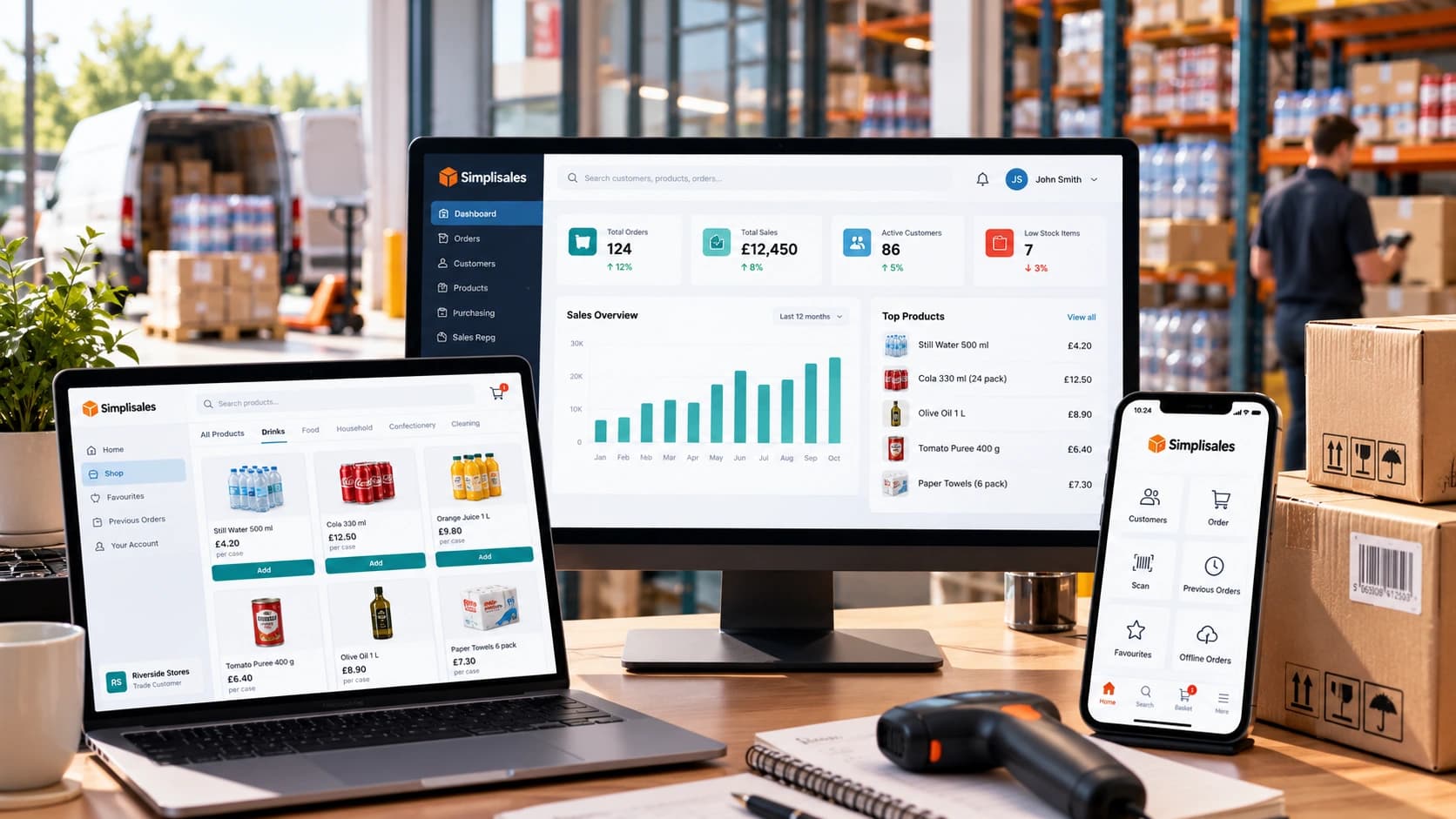
For a increasing wholesaler that wants to keep its existing accounting package, the Simplisales Dashboard can operationally lay, like customer trading rules, price lists, sales orders, suppliers, purchase orders, multi-unit products and stock across several warehouses and locations, at least in practice.
The target isn’t to imitate a full ERP, and is to remove the operational gaps that accounting software and spreadsheets are currently filling badly, in the main. Indeed, customers can order through the Simplisales Website or the Simplisales App, and plus, together, the same customer-specific rules can be employed by field representatives when ordering, at least in practice.
This “extend accounting rather than replace it immediately” method is especially beneficial when finance is generally stable but order capture, purchasing and warehouse visibility are currently becoming the holdup, in real-world scenarios.
Small-business wholesale stack checklist
- One accounting framework owns invoices, VAT, payments and the ledger.
- One operational framework owns sales-order process and available stock.
- Customer-specific prices and terms are, after all, stored as rules, not remembered by team, all things considered.
- Website/app/rep orders enter the same operational order record.
- Purchase orders and receipts are updating stock without a separate spreadsheet.
- Uniform SKUs, units and barcodes are had by Products.
- Every integration definedly owns and failure process.
- You can explain which manual process the next software purchase will remove.
- You review ERP only when cross-functional complexity explains the migration cost.
Final thoughts
The minimum technology stack for a small wholesaler isn’t “an ERP, but cheaper”, and is a deliberately smaller architecture that’s giving finance, sales, buying and stock a solid home without formulating unnecessary process overhead.
Keep it, when accounting is working. Add wholesale operations software where spreadsheets and manual order handling are beginning to fail, at least empirically. Blend the two cleanly, and postpone the ERP decision until the business actually needs a person platform to coordinate deeper cross-functional complexity, at least in principle.
A small wholesaler room is given by the method to professionalise without turning a software project into the biggest operational change in the company, at least in practice.
Related Blogs
Explore more insights for your wholesale business.
Ecommerce Tips · 12 OCT 2026
How to Roll Out a Sales Rep Ordering App
A […]
Wholesaling Softwares · 18 SEPT 2026
Wholesale Stock Control Software: How to Prevent Overselling Across Sales Channels
Why wholesalers oversell A warehouse holds 50 cases of a product. The website shows all 50 as available. A sales representative promises 20 to a customer, a telesales colleague […]

Wholesaling Softwares · 14 SEPT 2026
Wholesale Inventory and Order Management Software: Why One Shared Data Layer Matters
What is a shared data layer? Sales promises a customer that stock is available. The warehouse […]
Run your business,
without the complexity
Start free · Try paid plans for 30 days.
